


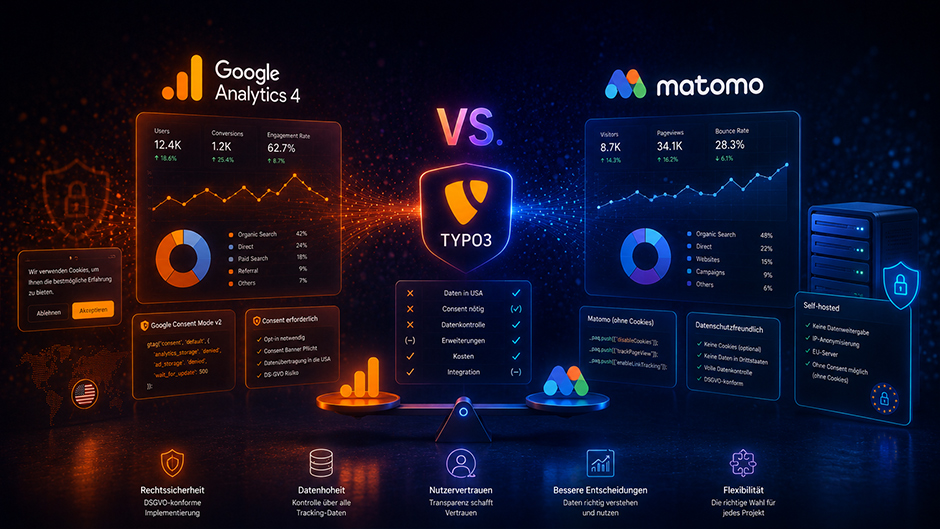
Google Analytics 4 vs. Matomo in TYPO3: Setup, Privacy and a Real-World Comparison
A choice that goes beyond technology
Anyone working on a TYPO3 project today will inevitably face the question of which analytics tool to use. Choosing between Google Analytics 4 (GA4) and Matomo is no longer a purely technical decision – it is a legal, strategic, and sometimes ethical one.
In this post I share what I have learned from real TYPO3 projects: how to integrate both tools, what each means for GDPR compliance, and when I recommend which option to my clients.
Integrating Google Analytics 4 in TYPO3
Option A: Directly via TypoScript (no extension required)
The most straightforward way to embed GA4 is directly through TypoScript in your sitepackage. The script should only load after user consent has been given. Here is a minimal example:
page.includeJSFooter.ga4 = www.googletagmanager.com/gtag/js
page.includeJSFooter.ga4 {
  async = 1
  external = 1
  disableCompression = 1
}

page.jsFooterInline.ga4init = TEXT
page.jsFooterInline.ga4init.value (
  window.dataLayer = window.dataLayer || [];
  function gtag(){dataLayer.push(arguments);}
  gtag('js', new Date());
  gtag('config', 'G-XXXXXXXXXX', { 'anonymize_ip': true });
)
Important: Always place this block behind a consent check – either via a TypoScript condition or a dedicated consent extension (see option B).
Option B: With a consent extension
For a GDPR-compliant opt-in setup I recommend combining EXT:cookieman or EXT:cookie_consent with Google Consent Mode v2. The latter has been mandatory since March 2024 for anyone using Google advertising services. GA4 is pre-loaded in "denied" mode and only fully activated after the user gives consent:
// Consent Mode v2 – include before the GA4 snippet
gtag('consent', 'default', {
  'analytics_storage': 'denied',
  'ad_storage': 'denied',
  'wait_for_update': 500
});
Integrating Matomo in TYPO3
Self-hosted Matomo via TypoScript
In most of my projects Matomo runs on a dedicated subdomain (e.g. matomo.example.com) or the client's own server. The TypoScript integration is clean and straightforward:
page.jsFooterInline.matomo = TEXT
page.jsFooterInline.matomo.value (
  var _paq = window._paq = window._paq || [];
  _paq.push(['disableCookies']); // No cookie = no consent banner needed
  _paq.push(['trackPageView']);
  _paq.push(['enableLinkTracking']);
  (function() {
    var u="https://matomo.example.com/";
    _paq.push(['setTrackerUrl', u+'matomo.php']);
    _paq.push(['setSiteId', '1']);
    var d=document, g=d.createElement('script'), s=d.getElementsByTagName('script')[0];
    g.async=true; g.src=u+'matomo.js'; s.parentNode.insertBefore(g,s);
  })();
)
The key line here is _paq.push(['disableCookies']). With cookie tracking disabled, Matomo stores no persistent identifiers. According to current guidance from German and EU data protection authorities, this configuration can be operated without a consent banner – provided IP anonymisation is active and the server is located within the EU.
Privacy comparison
| Criteria | Google Analytics 4 | Matomo (self-hosted) |
|---|---|---|
| Data transfer to the US | ✅ Yes (Schrems II relevant) | ❌ No |
| Consent required (DE/EU) | ✅ Always | ⚠️ Only with cookie tracking |
| IP anonymisation | Active by default | Fully configurable |
| Data ownership | With Google | 100 % with the operator |
| Data processing agreement needed | ✅ Yes (with Google) | Only with external hosting |
| Cost | Free (up to limits) | Self-hosted: free |
On the current legal situation: Germany's Data Protection Conference (DSK) and several state-level DPAs have repeatedly stated that GA4 cannot be operated lawfully without explicit user consent. Running GA4 without a consent banner carries a real risk of warnings and fines. This assessment is valid at the time of writing – the legal landscape can shift, so check regularly.
Feature comparison
Where GA4 has the edge
- Seamless integration with Google Ads and Search Console
- Cross-device and cross-platform tracking
- Machine-learning-based attribution models
- Funnel and conversion analysis at no extra cost
- Free – even for complex setups
Where Matomo has the edge
- Full raw data export without sampling
- Heatmaps, session recordings and form analytics (paid add-on)
- No data limits imposed by a third party
- Custom dashboards and white-label reports
- Built-in tag manager without sharing data with Google
My verdict from the field
I recommend Google Analytics 4 when the client actively runs Google Ads and genuinely needs attribution data, the marketing team is already familiar with GA4, and a consent banner is an acceptable trade-off.
I recommend Matomo when the project involves privacy-sensitive sectors (healthcare, legal, public sector), when the client wants to avoid a consent banner, when data ownership is a priority – and when the infrastructure for self-hosting is in place.
On several projects I run both in parallel: Matomo as a GDPR-safe baseline that is always active, GA4 only for users who have given explicit consent. This way clients always have data to work with – even when visitors decline the consent banner.
What are you using in your TYPO3 projects? I would love to hear your experiences in the comments.
Share
Leave a comment