


Dynamic QR codes in TYPO3 – why the resolver changes everything
The problem with regular QR codes
QR codes on printed materials have a fundamental problem: they're immutable. Anyone who encodes a URL directly into a QR code and prints it on flyers, trade show banners, or product packaging is locked in. If the target URL changes – a new campaign landing page, a domain migration, a site restructure – the QR code is worthless. Reprint everything or throw the old material away.
For one-off campaigns that's acceptable. But for anything with a longer lifespan – brochures, business cards, signage, product inserts – it's a real problem. That's exactly what led me to build a custom TYPO3 extension for this.
The solution: a stable resolver instead of a direct URL
The core principle is simple: the QR code doesn't contain the final target URL, but a short resolver URL that stays permanently stable:
/q/{uid}/{hash}
This URL never changes. What can change is the destination behind it – the target_url in the backend. An editor updates the target URL and saves – and all already-printed QR codes automatically point to the new page.
How the resolver works technically
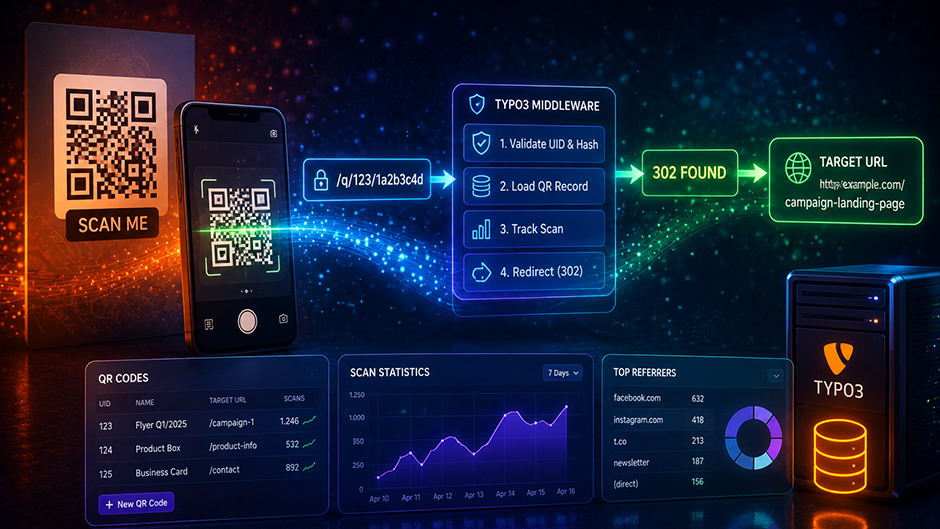
The extension registers a custom TYPO3 middleware that intercepts requests to /q/... before TYPO3 starts its normal rendering. The flow on every scan:
- Scanner opens
/q/123/1a2b3c4d - Middleware validates UID and HMAC hash
- QR record is loaded
- Scan is tracked server-side
- Middleware responds with a
302redirect totarget_url
The HMAC hash in the resolver path protects against guessing other QR UIDs. Every QR code has an individual hash that is verified server-side.
Integration with TYPO3 sys_redirect
What makes the extension particularly interesting: it uses TYPO3's native redirect infrastructure as an additional layer. This requires EXT:redirects to be installed – which is the case on most TYPO3 installations. When a QR record is saved, a DataHandlerHook automatically creates an entry in sys_redirect – or updates an existing one.
This has two advantages:
- Redundancy: Even if the custom middleware fails or is disabled, the redirect continues to work through TYPO3's redirect module
- Transparency: All active QR redirects are visible in the TYPO3 backend and can be audited by administrators
The actual functional tracking doesn't run through sys_redirect.hitcount though, but through a dedicated scan table with significantly more context: timestamp, referer, user agent, hashed IP and bot detection.
Server-side tracking – why it matters
QR code scans come from camera apps, messenger previews and external browsers. Client-side analytics JavaScript often doesn't execute in these contexts – or the user has JavaScript disabled. The extension therefore tracks server-side directly at the resolver entry point: every scan is counted regardless of what happens in the browser afterwards.
The result is reliable numbers directly in the TYPO3 backend: total scans, unique scans, human vs. bot, daily trends, top referers – all without external analytics tools.
What else the extension does
Beyond the resolver concept, the extension offers quite a bit more: QR code generation as SVG with extensive styling options (dot styles, eye styles, gradients, logo, shadow), a live preview directly in the TYPO3 backend without saving, style presets, and a CSV export of raw scan data.
The extension is not publicly available at this time. If you're interested in a licence or a project-specific implementation, feel free to get in touch.
TL;DR
- QR codes point to a stable resolver URL
/q/{uid}/{hash}instead of directly to the target URL - The target URL can be changed in the backend at any time – printed QR codes remain valid
- A TYPO3 middleware intercepts resolver requests, tracks server-side and redirects via
302 - TYPO3
sys_redirectis automatically synchronised – as a redundant layer - Tracking runs server-side – works without JavaScript and in camera apps
Share
Leave a comment